
How OpenClaw can use a logged-in browser reliably with Reduck MCP
OpenClaw has become in 2026 one of the most popular open-source agents: a personal assistant that answers from WhatsApp, Telegram or Slack, day and night, through a gateway that runs on your machine or on a server.
However, as soon as a task needs a website, OpenClaw faces two major problems:
- Infra: the agent must be logged in to your sites, and must not be spotted as a bot, which is a real challenge today:
- The managed browser profile OpenClaw opens is a separate Chromium, with a detectable signature and none of your sessions
- Cloud browsers (Browserless, Browserbase and other CDP providers) are spotted due to their datacenter IP
- Attaching to your real Chrome needs remote debugging on, and a gateway on the same machine; copying cookies into the managed profile only works on macOS and leaves local storage behind
- Reliability, cost and speed: even when the browser works, the model decides every click. It learns how a site works again on every task: that is slow, it fills the context, and a weaker model gets lost halfway. For an assistant that runs jobs unattended at night, a run that gets lost fails with no one there to see it.
Introducing Reduck MCP
That’s why we built Reduck MCP: the easiest way for an agent to integrate and automate any site you use.
Reduck MCP allows agents to discover, run and create browser automation scripts that serve as tools.
Scripts run in your own Chrome, through our extension, which allows your agent to work where you are logged in: no credentials exposure, and the risk of bot detection is minimal, as sites see your usual fingerprint and residential IP.
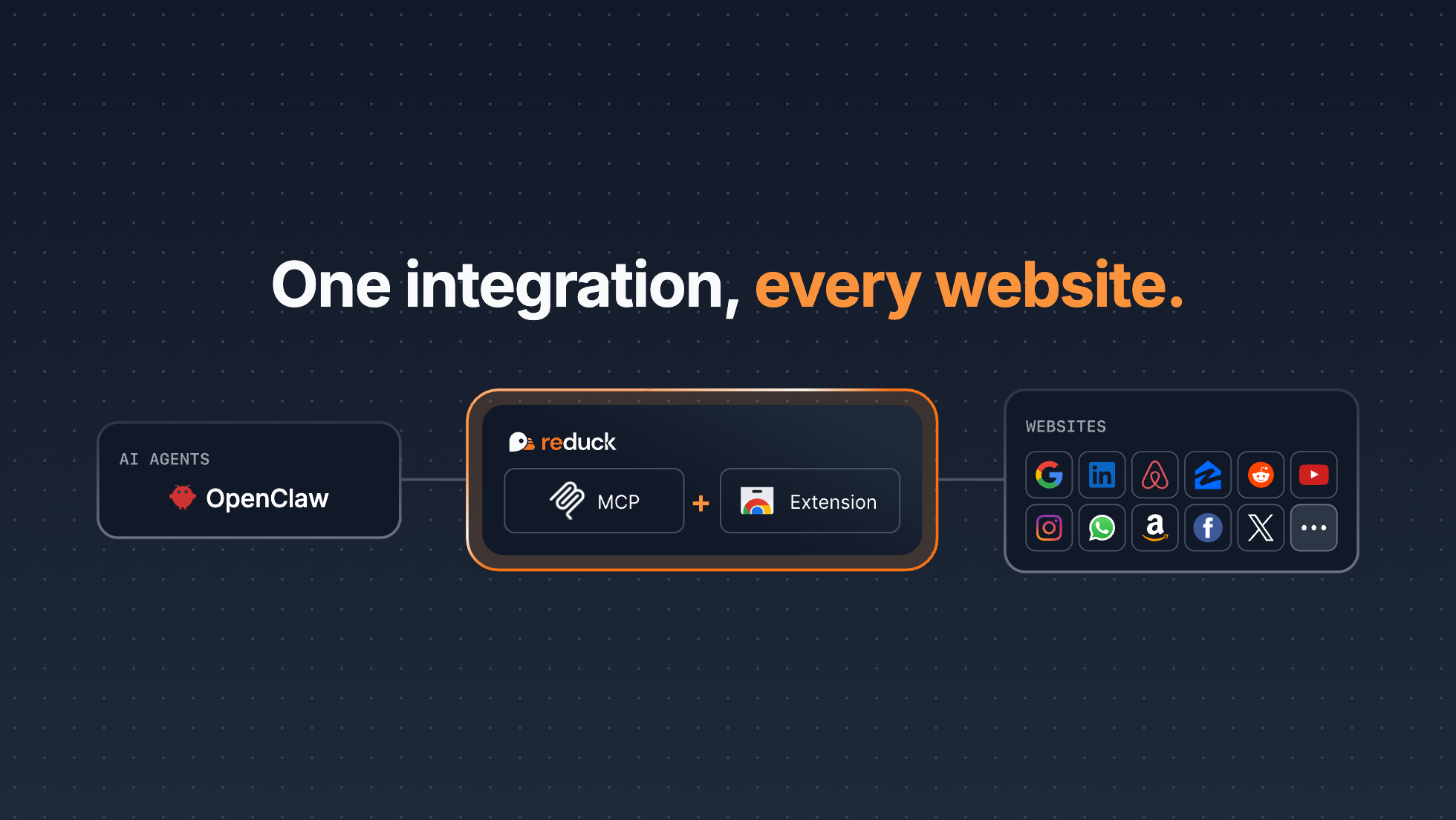
By connecting OpenClaw to Reduck MCP, the two major issues we mention are solved:
- OpenClaw now operates on the user’s logged-in Chrome profile through our extension, thus inheriting a real browser fingerprint and IP. Therefore OpenClaw no longer has any credentials or bot detection issue, and your passwords never go into the gateway.
- OpenClaw can use browser automation scripts as if they were tools, therefore saving tokens, and gets work done faster and more reliably.
We have already observed tasks such as market discovery or invoice fetching taking 3 times fewer tokens when using Reduck MCP scripts over direct usage. A more detailed benchmark will be released soon.
Demo
Get started in minutes
- Create an account at reduck.ai
- Install our extension in the Chrome you are logged in with, and pair it
- Add Reduck MCP to OpenClaw, in a real terminal:
openclaw mcp add reduck \
  --url https://mcp.reduck.ai \
  --auth oauth \
  --transport streamable-http
openclaw mcp login reduck
Keep
--transport streamable-http. Without it OpenClaw tries SSE and fails withSSE error: Non-200 status code (400), which looks like an authorization error but is not.
- Let Reduck scripts run without a confirmation on each call, so a night job does not stop halfway:
openclaw mcp configure reduck --approval auto
- From your usual chat app, try a prompt like:
Using Reduck MCP, search on Google the top 3 latest posts of the week
on "AI Agents" on LinkedIn. Then return the profiles of potential
buyers of B2B AI agents
Build your own scripts
If the library does not have the site you need, such as a government portal or your own ERP, ask OpenClaw to build the script with Reduck MCP:
Use Reduck MCP to create scripts for trends.google.com keywords
OpenClaw can then find your script with Reduck MCP, like any official one, and you can see it at reduck.ai/projects. The script is saved under your account, not on the gateway host: a second gateway, a new laptop or a teammate reaches the same script.
Key features
- Runs in your own Chrome: scripts run in your everyday Chrome through our extension, where you are already logged in. No managed profile, no debug port, no cookie copy. Your credentials stay on your machine, and sites see your usual fingerprint and residential IP, so the risk of bot detection is minimal. The extension connects out to Reduck, so it works even when the OpenClaw gateway runs in Docker or on a VPS: your Chrome only needs to be open.
- Learns a site once: a script is a saved automation with typed inputs and outputs. OpenClaw calls it in one tool call instead of clicking step by step, and gets the same result every time.
- Official Script Library: get started in minutes with the scripts we maintain for the most common sites, such as LinkedIn, WhatsApp, Airbnb and Instagram.
- Parallel runs: up to 20 scripts run at the same time from a single tool call.
Learn more
- OpenClaw guide: setup details, and what to do if Reduck does not appear
- Reduck for OpenClaw: use cases for a personal assistant
- Core concepts: scripts, devices and where a run happens
- Discord: chat with us about issues and ideas